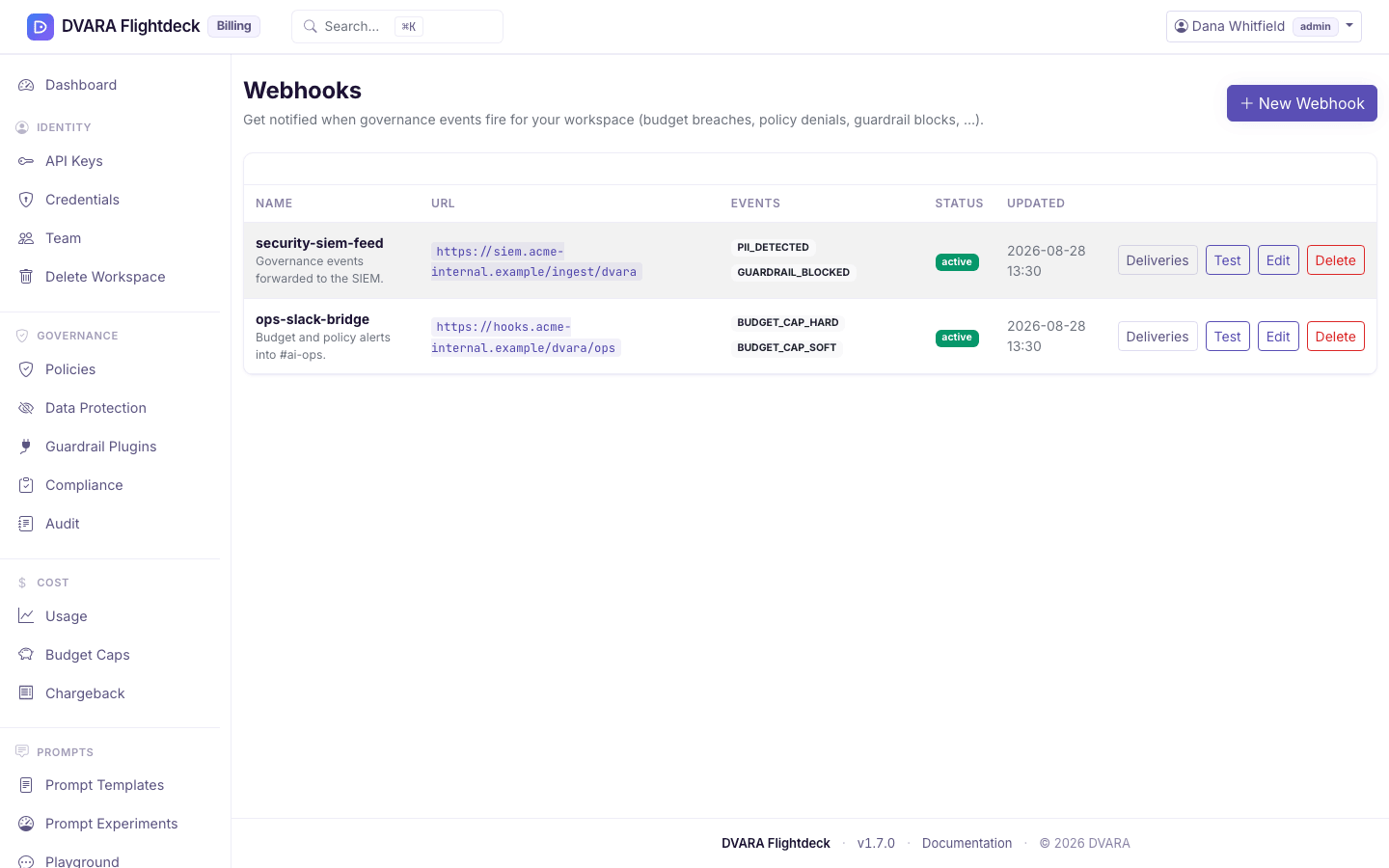
Subscribe to events with webhooks
Not included in DVARA Open Source.
Webhooks are how your workspace gets notified the moment something happens — a policy denies a call, a budget cap fires, a credential rotation completes. Every webhook is signed with HMAC-SHA256 so the receiver can verify the payload genuinely came from DVARA.
Sign in as a workspace admin or developer. Webhook configuration remains available when System Status shows the gateway as Unavailable, but data-plane events are delivered only while the Gateway is processing traffic.
Pick the events you care about
Each subscription has a name, a URL, an HMAC secret, a list of event types, and an enabled flag. Start small — subscribe to one or two event types you actually plan to act on, not the whole catalog.
Good first subscriptions:
POLICY_DENIAL→ Slack or PagerDuty: "we just blocked a call, here is what."BUDGET_CAP_HARD→ on-call channel: "we hit a hard budget cap, traffic is failing."GUARDRAIL_BLOCKED→ security channel: "a guardrail just blocked a call."
The form lists the event types you can subscribe to: POLICY_DENIAL, PII_DETECTED, IP_ACCESS_DENIED, BUDGET_CAP_SOFT, BUDGET_CAP_HARD, BUDGET_WARNING, COST_ANOMALY, INJECTION_DETECTED, GUARDRAIL_BLOCKED, AGENT_LOOP_DETECTED, MCP_APPROVAL_REQUESTED, MCP_APPROVAL_TIMEOUT and NOTIFICATION. They are a subset of the events you can search in the audit log.
Add a webhook URL
- Open Agents → Webhooks in Flightdeck and click New Webhook.
- Give it a name (e.g.
slack-policy-denied), paste the receiver URL (must be HTTPS in production), pick event types, generate or paste an HMAC secret, and enable it. - Submit.
Which URLs are rejected, and why
The form rejects URLs that point at network ranges that should never receive a workspace's events:
- Loopback (
127.0.0.0/8,::1) - Private RFC1918 (
10.0.0.0/8,172.16.0.0/12,192.168.0.0/16) - Link-local (
169.254.0.0/16,fe80::/10) - Cloud-metadata services (notably
169.254.169.254) - IPv6 unique-local (
fc00::/7) - Carrier-grade NAT (
100.64.0.0/10) - Anything that is not
http://orhttps://
Flightdeck validates egress destinations on the server, so a workspace cannot submit a webhook that points to those ranges and make DVARA reach internal infrastructure.
If you get a rejection on a URL you expect to be valid, the most common cause is a DNS name that resolves into one of these blocked ranges. Use a routable, public endpoint (a hosted webhook receiver, your own ingress over HTTPS) instead.
The same check runs again at every delivery, before DVARA connects. If the receiver's name later resolves to one of these ranges, the delivery is not sent and not retried, and Test says nothing was sent. Private ranges are reached only when your operator allows them for workspace pages, and only for webhooks saved after that.
Send a test event
Click Test on any webhook to fire a synthetic event through the real delivery pipeline. Flightdeck shows whether the receiver returned 2xx, the latency, and any error message.
The test event is synthetic — it is not subscribed to your actual traffic. Use it to confirm the receiver is up, the signature verifies, and your handler runs end-to-end. Once it passes, real events flow as the data plane and Flightdeck produce them.
Read the delivery history
Click Deliveries on the webhook's row in the list. Each delivery shows its time, event, status, HTTP code, number of attempts, last attempt time, and error (deliveries retry with exponential backoff on 5xx failures). Filter by status (PENDING, SUCCESS, FAILED, DEAD_LETTER) or by event to find the deliveries that failed.
The delivery log is bounded in size — old entries age out on a retention schedule your operator has configured.
Rotate the signing secret
Open the webhook, click Edit, paste a new HMAC secret, submit. The new secret takes effect on the next delivery. Coordinate with the receiver before you submit — there is no grace overlap on the signing secret.
The secret never appears in clear text in the audit trail. If you want to roll a secret without a coordinated cutover, the safest path is to add a second webhook with the new secret, switch the receiver over, and delete the old subscription.
What every action writes to the audit trail
| Action | Audit event |
|---|---|
| Add a webhook | WEBHOOK_CREATED |
| Edit a webhook | WEBHOOK_UPDATED |
| Delete a webhook | WEBHOOK_DELETED |
| Send a test event | WEBHOOK_TESTED (carries event_type, success, optional error) |
The HMAC secret is never included in any audit payload.